Wednesday, March 4, 2015

Website Wednesday


From Free Technology For Teachers - This blog post features a short video created by Minute Physics on how modern light bulbs work and how the design has changed over the last 100+ years. it also provides applications for classroom use.
tags: light bulbs electricity activities teaching videos
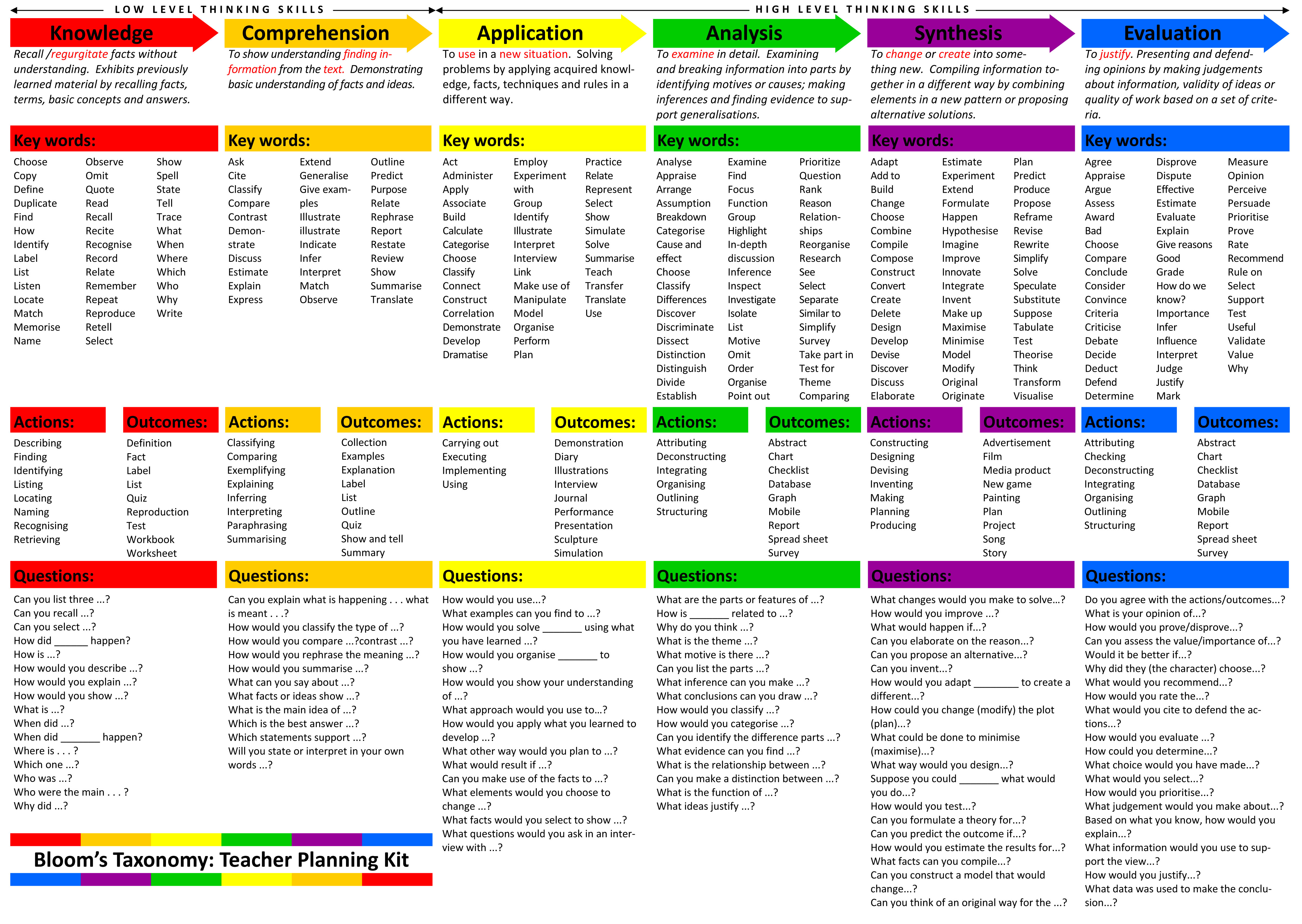
Great resource for teachers - provides definition, key words, actions, outcomes and questions for the thinking skill levels in Bloom's Taxonomy.
tags: teaching instruction bloom's taxonomy assessment
Collection of story starter ideas for writing assignments or digital storytelling activities.
tags: writing prompts storytelling digital storytelling resources
From PBS Learning Media, this 5 minute video relates the history behind single women homesteaders and the 1862 Homesteading Act. You can opt to stream or download the video. You can also see the standards tied to this content.
tags: social studies classroom resources pbs videos
As you explore the various demographical information available, the country size will shift to indicate the data being depicted. This is a great for visual learners! With one quick glance you can see which country has the highest number in a specific area. When you hover your mouse over a country, you will get the country name and actual numbers.
tags: maps demographics geography interactive web2.0 resources technology


Monday, March 2, 2015

Getting my art on at TIG


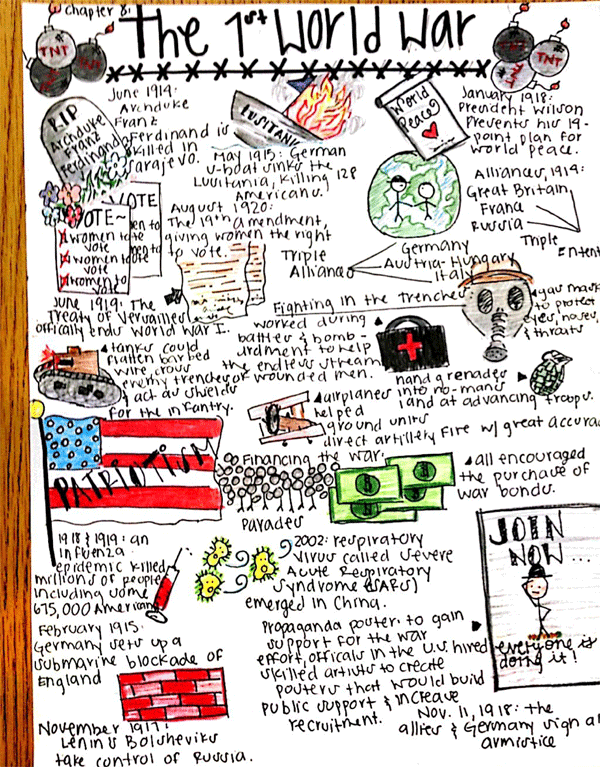
This month at TIG we took a different exploration direction and did something totally non-techie.  Well, you could turn it into a techie thing depending on the tool you used, but I'll talk about that more later.  A 'new' educational trend is Sketchnoting.  To look at a sketchnote, you would say 'Oh, that's just someone doodling while they are taking notes.'  True, sketchnoting is a form of doodling, but it is doodling with a purpose.  Basically, sketchnoting is a visual method of note taking.  It is a combination of writing and drawing to create more visually appealing notes.  There are many methods to choose from when sketchnoting.  You can use a mind mapping approach, a linear approach or even a boxed approach.

http://nuggethead.net/2013/09/preparing-sketchnote-format-visual-flow-and-materials/

My first Sketchnote experience
Since most of us at TIG had heard of sketchnoting, but hadn't really explored or experienced it first hand, we dove into a variety of resources.  We looked at everything from tools for getting started to video tutorials on sketchnote doodling.  We also jumped in with both feet and did our own sketchnotes over a 20 minute TED Talk.  I have to admit that while I didn't see much of the session, I was keyed in on what the speaker was saying.  Although I've always been a note taker, it helps me focus, adding the visual of sketchnoting really planted the ideas in my mind and helped me recall the information.

Now, I am not an artist by any means.  My middle school art teacher told me to give up the craft because I was too much of perfectionist.  I've never even been much of a doodler even when we use to have the old corded telephones in our homes.  It wasn't for lack of trying, but I never could think of anything to doodle.  However, after experiencing sketchnoting first hand, I found myself buying some colorful pens and a sketch book.  I've started practicing my doodling skills with some assistance from online resources and the Sketchnote Workbook by Mike Rohde.


As I started writing this blog post, I started thinking and looking at how sketchnoting might be used in the classroom.  First, I want to say that sketchnoting might not be for all learners, however, it's not a bad thing for all learners to experience new forms of learning.  Why?  Well, it gives us new perspectives into learning and you never know when a new form of learning might actually work for you.  One idea we did talk about in TIG was having students watch a content video created by yourself or someone else and sketchnote the key points.  Then put the students into small groups and have them compare their notes and reflect on the experience.  What key points stood out to them?  Did they miss anything?  Do the visuals help you understand the concept?  What did you draw and why did you draw it?


As sketchnoting is still fairly new on the education scene, I did some digging to find other ideas for using this form of note taking with students.  Check out these examples:

Mindmapping - This activity combined low-tech and high-tech to create a completed product.


Unit Summaries/Reviews -  Great way to sum-up the key concepts over specific units


Book Review/Summary - Take the traditional chapter summaries and add a visual flare


More ideas:

Learn more about Sketchnotes:
Sketchnoting - visual note taking tips, pointers and practice

What do think?  Are you game to try some sketchnoting personal?  Would you be willing to try this with your students?  I'd love to hear about your experiences with sketchnoting!

Wednesday, February 18, 2015

Draggo


Draggo is a bookmarking tool for those websites you want to remember or use on a regular basis.  You can group your bookmarks with topic specific tabs and then into various categories on each tab.  Bookmarks can be moved and edited as needed.  A couple years ago I created Draggo accounts for each school building (except Westside - sorry) in our district in an effort to provide links to tools and websites that the students would use regularly - or for a specific teacher - throughout the course of the school year.

In the elementary buildings, teachers have their students set the building Draggo page as their homepage whenever they get on the Internet.  This makes it easier and faster for students to access the websites they need during class.  Students have no need to log into Draggo.  They just choose the tab they need and find the bookmark in the category given to them by their teacher.  Here are the links to each building Draggo page:


I have encouraged teachers to take ownership of their building Draggo page by giving them the log in information so they can add and remove links, categories and tabs.  I do ask if a specific grade or teacher has a tab that you not edit or remove their tab.  We are limited to seven tabs, so if we are running out of tabs, let me know so I can assist in making some modifications.  If you never received the log in information for you school's Draggo page, please email me and I will send that out to you.

Draggo is not the only bookmarking tool available, but at the time it was highly recommended.  If you are interested in exploring other visual bookmarking tools to use with your students, you might check out:

"How-To" Edit Draggo


Website Wednesday...for February


I just realized today that this month has been so full I haven't had time to post any of the great Website Wednesday resources.  So here is the collection for February.  I hope you enjoy!

This chart provides examples for shifting your traditional homework assignments to engaging, learning tasks for students.


    Although the designated Random Acts of Kindness Week is over, there are some excellent resources and ideas to continue encouraging Random Acts of Kindness in your classroom, school and community.


      Great resource for geography!


        Get a basic understanding of Augmented Reality (AR) along with some printable interactive resources that you can use right way in your classroom.


          Take this Internet Safety test from the Safer Internet Centre. Students are given different scenarios and must determine the best course of action. Good resource for digital citizenship.


            Explore and study the Middle East - the past and the present - with these 40 various maps covering political borders, demographics, religion and more.


              On historypin, history is recorded with photos from the past and present. As a teacher, you could use this site by having students explore and interact with photos from specific time periods and/or locations. There are photo collections and tours that you could use as a whole class or individually. These are great primary sources for studying history. Check out this video to a short intro to historypin - https://www.historypin.org/about-us/.

                Fun Facts for Kids on Animals, Earth, History and more! Please note that this link is beta mode right now, so feel free to give them feedback so they can improve this fun fact resource.


                  View the Common Core State Standards in one convenient FREE app! A great reference for students, parents, and teachers to easily read and understand the core standards. Quickly find standards by subject, grade, and subject category (domain/cluster). This app includes Math standards K-12 and Language Arts standards K-12. Math standards include both traditional and integrated pathways (as outlined in Appendix A of the common core) and synthesizes Language Arts standards with the Corresponding College and Career Readiness Standards (CCR's).


                    View the Next Generation Science Standards in one convenient FREE app! A great reference for teachers, parents, and students to easily read and understand the standards. Quickly find standards by various topic arrangements or keyword search.

                    Wednesday, January 28, 2015

                    Website Wednesday

                    Search apps for the iPhone, iPad and Android using a variety of search methods. Select a specific category from general categories to specific topics. Use the filter to only see apps that are free, have no in-app purchases and are for a specific age grade. Great resource when looking for apps to use at school or home.
                    The quick and safe way to find and cite images for class! Searches through the Creative Commons photos on Flickr. *Please note that the students will not be able to see the images at school, but they could use this tool at home to find photos for their school projects. They still need to give credit.
                    Provides math games geared toward specific concepts at each grade level for K-6. You can access four games without registering. Teachers can join for free, which allows teachers and students to access all the games for free while at school. You must pay for students to use these games at home.
                    Great resource for information on President Lincoln. Provides activities, research topics, critical thinking questions, vocabulary, lesson plans and more.

                    Help students understand the human body - including the skeletal, muscular, circulatory, respiratory and nervous system - with these 14 StudyJams! activities.

                    Posted from Diigo. The rest of my favorite links are here.

                    Thursday, January 8, 2015

                    Blogging with Primary Students

                    This school year, a few of our elementary teachers ventured into the world of blogging with their
                    students.  They have been using their class blog to have students demonstrate how to do a math problem, explain what they know about a specific topic, and share their projects (artwork, tech projects, etc.).  These teachers have been using Kidblog as it was the only tool we had available at the time.  However, this fall, we purchased the app Easy Blogger Jr. (now referred to as Blogger Jr.) for the primary grades.  This tool allows students who can't type or are slow typists to post photos with an audio recording and videos.  So a Kindergarten student could collect a group of items starting with the letter for the week, take a photo, and record themselves saying the letter and identifying each item.  Blogger Jr. is a good tool for allowing young students to experience the world of blogging.

                    Blogger Jr. connects to Blogger for posting your student's photos, videos and typing (should your students be ready to venture into the world of typing).  As a result, you will need to do some prep work setting up a blog and activating a YouTube account for the student videos.  Fortunately, you can use your school email account to activate YouTube and set-up Blogger.  If you have never accessed the YouTube channel associated to your school email, they you will need to follow the instructions on this website - Creating a Google/Gmail and Activating YouTube.  If you are using a school email account, then begin with step #4.

                    Once you have your YouTube account activated, you are ready to set-up your class blog in Blogger.  The following video (click the link below the image) will walk you through setting up your class blog where students will post via Blogger Jr.  It will also show you how to add students to in the Blogger Jr. app.  Adding students into the Blogger Jr. app becomes the one time consuming task of the whole process.  You must set-up the app on each device so it connects to your class blog and you have added the student or students who will be using Blogger Jr. on that device.

                    Easy Blogger Jr
                    Prior to setting up the Blogger Jr. app, you might want to take a photo of the student(s) who will be added on the device.  For example, if Susan and Marcus are going to use iPod #1 for completing their blog posts, then I would use that iPod to take a photo of each student.  When I add them to Blogger Jr., I will put in their first name and photo.  This allows them to see their photo on the login screen of Blogger Jr.  This student photo is not posted out on the class blog, it is only for the use of the Blogger Jr. app on that one device.


                    Before students begin blogging, you will want to cover the basics of blogging and any rules that you would like them to follow.  This might include how to use the app, not blogging unless the teacher has asked you to, not using their name in a post, don't say anything hurtful or untrue, etc.  I'm not as artsy as my elementary teachers, but you might create your own poster with the class blogging rules as a reminder for your students.

                    So, you're all set-up with Blogger Jr., now how can you use this tool with students?  Here's a list of things students could blog about:

                    • Photo of their artwork
                    • Something new you learned today
                    • Your class pet
                    • Math problems using manipulatives
                    • Counting Practice
                    • Book Reviews
                    • Reading practice
                    • Making patterns
                    • Tell what you know about a specific topic

                    Needing some additional assistance with Blogger Jr?  Here are some quick links to their support resources: