Monday, September 18, 2017

Tuesday, November 8, 2016
Thanksgiving Fun
 |
| http://www.publicdomainpictures.net/pictures/60000/velka/turkey-with-sign.jpg |
Wizer Worksheets
The First Thanksgiving by Haley Throneburg - Respond to questions as you explore the Mayflower, daily life comparisons between the Pilgrims & Wampanoag, and the first Thanksgiving feast.(5th grade - 10 questions)
Thanksgiving in a Box: Converting Measurements by Amanda Heflin - 5th graders will need their math skills to answer the Thanksgiving meal conversion questions on this worksheet.
(5th grade - 8 questions)
Education.com
Thanksgiving Crossword Puzzle - answers are on the bottom of the sheetThe Pilgrims - Short reading passage with important facts about the pilgrims. The passage ends with a couple reflection questions for student writing or group discussion.
The First Thanksgiving - A readers theater script with six parts
Plymouth Colony - This short reading passage focuses the establishing of the first town and the Mayflower Compact. When students have finished reading the passage, they are challenged to write their own compact.
Native American Advocates - Students will learn about some Native American advocates in this short reading passage. They conclude with three short thought-provoking questions related to the article contents.
15 Printables for Turkey Day - Printables include math sheets, word search, rebus story and more. You do need to create a free account to download any of these files.
Videos
Bet You Didn't Know: Thanksgiving - Learn about Thanksgiving traditions they were not part of the first Thanksgiving (Recommended for 5th-12th grade; length - 3 mins)History of Thanksgiving - Learn more about the history of Thanksgiving including the start of the Thanksgiving Day parade. (Recommended for 6th-12th grade; length - 4 mins)
The First Thanksgiving by Little Fox - Learn about the first settlers. (Recommended for K-3rd grade; length - 5 mins)
Charlie Brown Mayflower Voyagers - Learn about the pilgrims and the Mayflower with Charlie Brown and the gang. (Recommended for 1st-3rd grade; length - 24 mins)
A Charlie Brown Thanksgiving - The classic Charlie Brown Thanksgiving special. (Recommended for all ages; length - 25 mins)
The Great Turkey Race - Listen to this great picture book Steve Metzger and discover what being a Thanksgiving turkey means to the turkeys. (Length - 7 mins)
Other
The First Thanksgiving by Scholastic - Includes videos, virtual tours, slideshows and teacher's guides for grades PK-2, 3-5 & 6-8.8 Quick Ideas for the Week Before Thanksgiving - Provides craft and project ideas that you can do with students of all ages.
Thanksgiving Ideas for the Classroom - A collection of classroom lessons, quizzes, activities, games and more for grades K-5, 6-8, and 9-12.
Thanksgiving Word Search & Give Thanks Word Search- Word searches great for any age
Your Teacher Is Thankful For You - Free printable certificates you can give your students expressing why you are thankful for them.
Free Thanksgiving Printables - This collection includes count & color, thankful list, color by number, coloring page, and write the letter.
Sunday, July 31, 2016
Why should I be a connected educator?
 |
| Book cover image |
As I think about the reasoning behind being a connected educator, I'm drawn back to my first teaching job. I was fresh out of college taking a high school English position at a school that serviced the juvenile correctional facility just outside of town. Most of the students were boys ranging from age 13 to 21. There was no textbook, no curriculum, and no scope and sequence. I had to figure out what the students needed most in the area of their English education. Wow! What a task for a young twenty-something novice teacher! I felt like I had been shipwrecked on an island with limited resources and told to survive - Oh, and don't forget to take care of these kids too. Sure there were other teachers at the school, but they had their own content and classes to worry about. Sadly, there was no Twitter, Facebook or even Pinterest to help me out. I truly felt on my own. This is probably the first key reason for an individual to become a connected educator. Even though you may work in a building with other colleagues, you still might feel like you are on your own island just trying to survive. Being a connected educator is like throwing a line out to someone else on their island and drawing you both together so you are not alone.
 |
| No Man is an Island |
What about you? Are you a connected educator or is it time to kick yourself off the island?
Wednesday, April 22, 2015
Website Wednesday


WordWriter
Providing teachers with an interactive and easy-to-deliver vocabulary development application (put
out by the makers of BoomWriter).
 Tackk
Tackk
Providing teachers with an interactive and easy-to-deliver vocabulary development application (put
out by the makers of BoomWriter).
This post on Edutopia provides practical classroom strategies to reinforce student autonomy, competence, relatedness, and relevance.
Tackk
Educators are using Tackk in a wide variety of ways in the classroom. From daily announcements to
creating digital portfolios, the possibilities are endless. The ability to comment publically and privately allows for collaboration between teachers, students, or even with other classes.
Google Earth Tour of the Lincoln Assassination
creating digital portfolios, the possibilities are endless. The ability to comment publically and privately allows for collaboration between teachers, students, or even with other classes.
Google Earth Tour of the Lincoln Assassination
The tour focuses on the last days of President Lincoln and his killer, the famed actor John Wilkes Booth.

Wednesday, April 15, 2015
Website Wednesday
Think "fantasy football for social studies, literacy standards, and world news. Great way to get students engaged in learning!
ePals
ePals is an ideal way to collaborate with other classrooms around the world. You can set-up communication through Skype or emails between students. Teachers can search for a class to connect with by age range, language and regions.
ePals is an ideal way to collaborate with other classrooms around the world. You can set-up communication through Skype or emails between students. Teachers can search for a class to connect with by age range, language and regions.
Geared toward middle and high school age students. Great way for students and teachers to learn about the world they live in.

Canva
Canva
Canva is a tool that makes design simple for everyone. Canva gives you everything you need to easily turn ideas into stunning designs. Create designs for Web or print: blog graphics, presentations,
Facebook covers, flyers, posters, invitations and so much more.
Canva EDU Lesson Plans on Pinterest
Facebook covers, flyers, posters, invitations and so much more.
Canva EDU Lesson Plans on Pinterest
Collection of lesson plans for using the tool Canva with students.
tags: canva technology lesson plans lesson
tags: canva technology lesson plans lesson
Wednesday, April 8, 2015
Website Wednesday
This blog post focuses on completing Word Work on the iPad with elementary students. Thanks to Kayla Long for sharing this link!
Science Experiments For Kids | The Quirkles
Quirkles is the Science/reading book series that comes with 2 experiments to do at the end. They can be taught in any order so teachers could read the book or books that go along with the letters while they introduce them. Thanks to Renae Hukill for sharing this resource.
Science Experiments For Kids | The Quirkles
Quirkles is the Science/reading book series that comes with 2 experiments to do at the end. They can be taught in any order so teachers could read the book or books that go along with the letters while they introduce them. Thanks to Renae Hukill for sharing this resource.
This site is loaded with articles, resources and book recommendations geared toward the 4-8 grade educator. Topics are wide and varying.
"Classrooms can Skype with a Yellowstone National Park ranger to learn more about geology (geysers, hot springs, volcanoes), ecology (fire; wildlife--bears, bison, elk, wolves, and more), or cultural history (Native American, world's 1st national park, tourism). Students can interview a park ranger or try to guess which park the ranger works in."
Wednesday, April 1, 2015
Website Wednesday

 Ten Reflective Questions to Ask at the End of Class
Provides some basic observations about reflection along with 10 reflective prompt questions you can use with your students or for yourself. Great questions for wrapping up the day, a project or a lesson.
Nice collection of articles and infographics on the human brain and the impact in learning.
These whiteboard video creation tools are great for those exploring or working with the Flipped Classroom. They are also a great way to create concept videos to share with parents and students as homework helpers. Tool recommendations from FreeTech4Teachers.
This post by Alice Keeler focuses on tips to make you Google documents look more professional. Those tips include invisible tables, fonts, headers, painter, and graphics.
Includes Chrome Extensions, Google Doc Add-ons, Graphing & Calculators, and Google Drive Apps connected to Science and Math
Wednesday, March 25, 2015
10 Features of Google Keep

Last summer, I came upon a new tool called Google Keep. I liked it better than stickies because I could access them on any computer, but the features were limited and I couldn't access them on my Apple devices. Just this week I discovered that Google Keep has an Apple app and I've been taking a fresh look at this tool. Here's what I like about this tool:
1. It's free! Who doesn't love free resources?
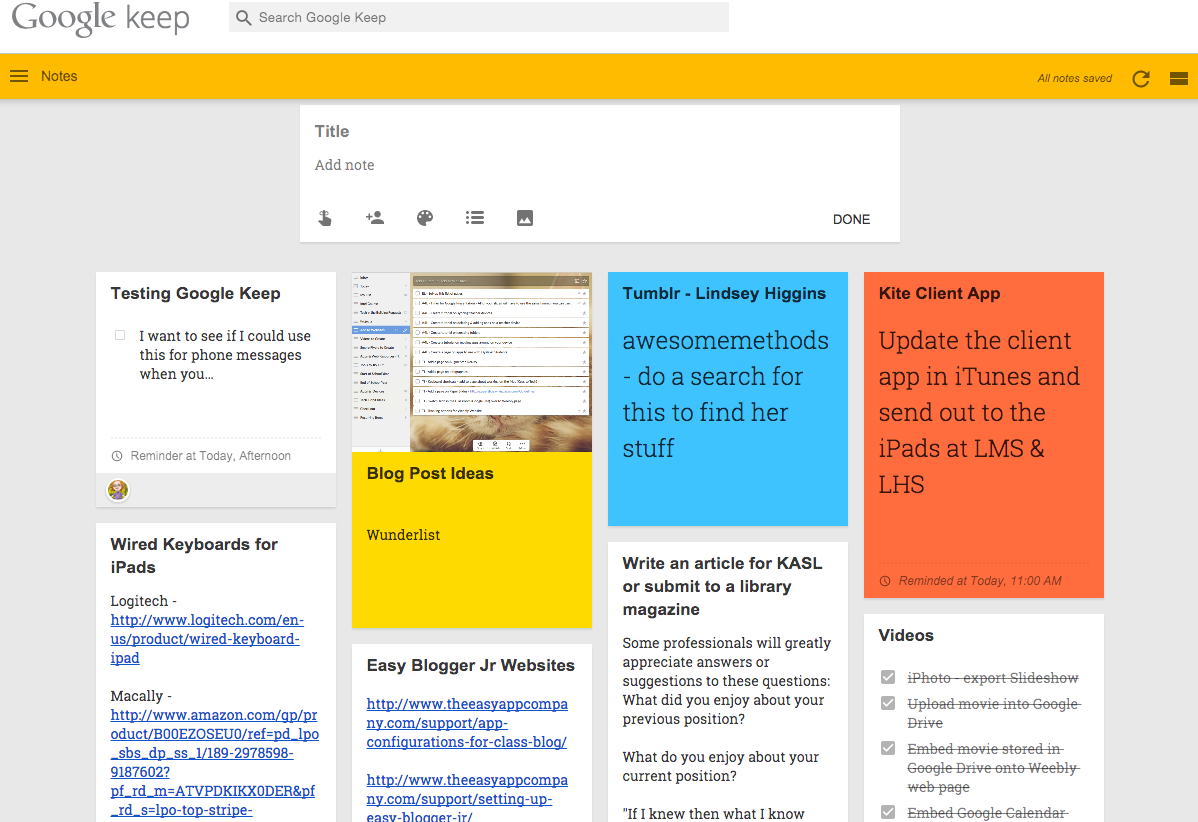 2. It's tied to your Google account. You know what that means? No additional username and password to remember! Because we are a GAFE district, students can also use this tool for reminders, notes and checklists. This becomes the perfect digital agenda for students.
3. Color!!!! I'm all for using a variety of color! Google Keep allows you to change the color of your notes. I like to use this as a means of organizing my notes. For example, red notes relate to my website, green ones are informational reminders, and teal notes relate to the Intel Courses. Students could use different colors for different classes to help them stay organized.
4. You can change notes from a regular note to a checklist with one click. This is great for projects or daily to-dos, especially for those of us who like to see what we've accomplished and what is left to complete.
5. You can add reminders on your notes by clicking the reminder icon (finger with a string tied on it). Customize your desired date and time on your reminder and you are all set to receive notification reminders. No more missed deadlines!
6. With a simple drag & drop action, you can rearrange your notes and put them in any order that works for you.
7. You can search and filter your notes by words, color, sharing, lists, images, and more.
8. You can add images and websites to your notes. This would be great for collecting images and websites for a specific lesson, unit or project. You could also take a photo at a workshop of a key slide or information being presented and add it to a note. Students could take a photo of the work for the week if their teacher posts it in the classroom. This feature would also help students keep track of online photo locations for images they use on a class project.
9. You can share notes with other people by clicking on the share icon. They will receive an email message with a link to the note. This would be great for sharing project responsibilities or sending out assignments to students.
10. There is an app! Android users have always had a Google Keep app option for their devices, but until recently Apple users had to just use the Chrome web browser on their devices. Now you can see you notes and receive notifications on the go by installing GoKeep. App Drawbacks - too many ads and no search or filter option! Hopefully that will be an upcoming update. There is an alternative app option called TurboNote for Google Keep. You still have ads at the bottom of the screen, but they are not popping up over the top of your notes.
Some additional tidbits:
- You can download the Google Keep app onto your computer from the Chrome Web Store.
- There is a Google Keep extension - Category Tabs for Google Keep - that allows you to assign specific categories to your note colors. However, there are some glitches with filtering the colors.
- This app runs offline!
Check out this video for a quick visual tour of this tool!
Website Wednesday

This blog post by Kasey Bell focuses on using Google Maps, Street View and Google Earth.
http://www.edutopia.org/pdfs/blogs/edutopia-finley-53ways-check-for-understanding.pdf
53 ideas for checking student understanding.
 The Key Differences Between Summative And Formative Assessments | Edudemic
This short article from Edudemic provides a simple definition between summative and formative assessments. They have also included a handy infographic for those of us who are visual learners.
10 edu-books to inspire and stimulate
Looking for a book to help you go to the next level as an educator? Matt Miller, author of Ditch the Textbook, offers his top ten list.
75 Practical Ed Tech Tips Videos
Educational 'how-to' videos created by Richard Byrne, FreeTech4Teachers, covering a variety of topics such as storyboarding, blogging tools and tips, audio recording tools and more. (See playlist below)

http://www.edutopia.org/pdfs/blogs/edutopia-finley-53ways-check-for-understanding.pdf
53 ideas for checking student understanding.
The Key Differences Between Summative And Formative Assessments | EdudemicThis short article from Edudemic provides a simple definition between summative and formative assessments. They have also included a handy infographic for those of us who are visual learners.
10 edu-books to inspire and stimulate
Looking for a book to help you go to the next level as an educator? Matt Miller, author of Ditch the Textbook, offers his top ten list.
Educational 'how-to' videos created by Richard Byrne, FreeTech4Teachers, covering a variety of topics such as storyboarding, blogging tools and tips, audio recording tools and more. (See playlist below)
Wednesday, March 11, 2015
Digital Learning Day + Pi Day = Engaged Learners
Digital Learning Day and Pi Day are fast approaching, but maybe you've never heard about these two days before.
 Digital Learning Day was started to showcase how technology can improve student outcomes and
support teachers. Many online education programs provide special activities for Digital Learning Day that emphasis the use of collaboration, sharing of best technology practices and boost technology learning for teachers and students.
Here are some resources that will assist teachers and students as they explore Digital Learning Day:
 Pi Day is an annual celebration commemorating the mathematical constant π (pi).
Digital Learning Day was started to showcase how technology can improve student outcomes and Here are some resources that will assist teachers and students as they explore Digital Learning Day:
- Digital Learning Day (official website)
- Digital Learning Day: Resource Roundup - includes a video introduction to technology integration, online learning and blended classroom resources, digital games in the classroom and more.
- Digital Learning Day: Activities and Ideas - includes lesson plans, digital tools and other resources
- PBS Learning Media: Digital Tools - short video tutorials on using free online tools for teaching and learning
- Digital Learning Day Facebook Page - collection of ideas and resources shared by other educators around the world
- PI Day (official website)
- Plan a Pi Day Party - Education World provides a list of lesson plans and activities for celebrating Pi Day with your students.
- Dunk Tank!: Circles - A fun interactive quiz show all about diameter, circumference, radius and pi created by PBS Learning Media.
- Teachπ.org - Find Pi Day videos, book recommendations, activities and more.
- 7 Classroom Resources for Pi Day - List put out by Edutopia
- Exploring Pi - This article from Scholastic provides some history on Pi as well as links to lessons geared toward elementary students.
Website Wednesday
 Speedometry – Learn Math and Science | Hot Wheels
Register for your free Hot Wheels kit and download the lesson plans that address STEM integration.
tags: stem physics math science lessonplans
Place Value lessons and games by
Sheppard Software. Students will identify the digits, compare numbers,
learn different ways of showing a number, and more. Geared toward
elementary students.
tags: place value math mathgames
tags: place value math mathgames
 "...the following series of
fill-in-the-blank prompts can be used by teachers to create lessons,
students to create projects–or teachers to collaborate with students to
create lessons–or projects.
Or, well, you get the idea. I use these sorts of stems to create
“learning blends” for students–either with them, or for them. I couple
these prompts with other components–technology like apps or social media
channels, texts from literary classics to postmodern non-fiction,
creativity, or even local matters of citizenship." -from Terry Heick,
author of this resource
"...the following series of
fill-in-the-blank prompts can be used by teachers to create lessons,
students to create projects–or teachers to collaborate with students to
create lessons–or projects.
Or, well, you get the idea. I use these sorts of stems to create
“learning blends” for students–either with them, or for them. I couple
these prompts with other components–technology like apps or social media
channels, texts from literary classics to postmodern non-fiction,
creativity, or even local matters of citizenship." -from Terry Heick,
author of this resourcetags: prompts projects PBL questions collaboration resources
Monday, March 9, 2015
New Tools & New People from TIG
New Tools and Resources
Mango Languages - This tool, available for FREE thanks to our Kansas State Library, will help you learn over 60 languages. You will walk through practical language lessons that provide pronunciation practice, grammar lessons, cultural information, and more. Did I mention there are English courses for non-English speakers?! Take a tour with the video below.
Buncee - A digital canvas where you can add content that can then be shared through email or social media. Students and teachers can use this tool to create more engaging and interactive presentations and lessons.
eMaze - This HTML5 presentation maker allows teachers and students to create slideshows, video presentations, infographics and 3D presentations. Need a quick tutorial? Check this one out from eMaze - https://www.youtube.com/watch?v=I-9nHq9ld6Q.
Visme - This another tool for creating presentations, infographics and banners. Your final products can be published via social media, on a website or downloaded.
Canva - This easy to use graphic design program will allow you and your students to create awesome graphics to share via social media, your website and blog or by downloading & printing. Get tips and ideas via the Canva Design School or create using the Canva iPad App.
Tapp Roulette - This is a "random picking" app. Need to decide who goes first in the game or who
 |
| Tapp Roulette |
Common Sense Media - This resource provides ratings and reviews on apps, games, books, websites and more geared toward children ages 2-17. They also provide media and technology resources for educators, including a whole curriculum for digital literacy and citizenship.
All the resources on this site are FREE!
New People to Follow
Needing to build up your PLN? Check out some of these great educators and educational supporters!TechChef4U - This is the twitter handle used by Lisa Johnson, an educator and tech integration guru. She has done extensive work on iPads and apps in the classroom, including the publication of the TechChef4U app and the Hot Apps 4 HOTS iBook.
 |
| TED Ed Lesson |
@TED-Ed - Provider links to their short, captivating educational videos and other educational resources.
@TeachingLC - The Twitter handle for Teaching with the Library of Congress. Their tweets contain primary sources, inspiration, ideas and opportunities for teachers from the world's greatest library.
@TodaysDocument - Tweets from Today in History & Daily Historical Documents from the US National Archive include loads of primary source photos that will enliven and engage your social studies classroom.
 |
| Tweets from PSNTPS |
@coolcatteacher - This is the brand name used by Vicki David, a full time teacher and IT director in Georgia. She shares thoughts and tips on using new technology in teaching.
@justintarte - This is the twitter handle for Justin Tarte, an administrator with a passion for learning
and technology. He shares thought provoking articles and photos via his Twitter account.
@PSNTPS - This twitter handle belongs to the TPS-Barat Primary Source Nexus, an online community support resource for the TPS-Barat Library of Congress Teaching with Primary Resources Program. These send out interesting tweets ideas for combining primary resources and technology to create engaging learning for your students.
@PenguinClass - This handle for the School and Library Marketing department of Penguin Young Readers provides tweets to author interviews, book & poetry lesson ideas, book trailers and more. They will also do Skype author visits with your classroom for free. Email them at penguinauthorvisits@gmail.com and tell them what you want. For example, you want to Skype with a poet or an author who writes nonfiction, preferably about bugs.
Travis True (on Google+) - Travis is an educator in the Topeka Public Schools. He shares a lot on Chromebooks, Chrome extensions, and all things Google.
Wednesday, March 4, 2015
Website Wednesday

From Free Technology For Teachers - This blog post features a short video created by Minute Physics on how modern light bulbs work and how the design has changed over the last 100+ years. it also provides applications for classroom use.
tags: light bulbs electricity activities teaching videos
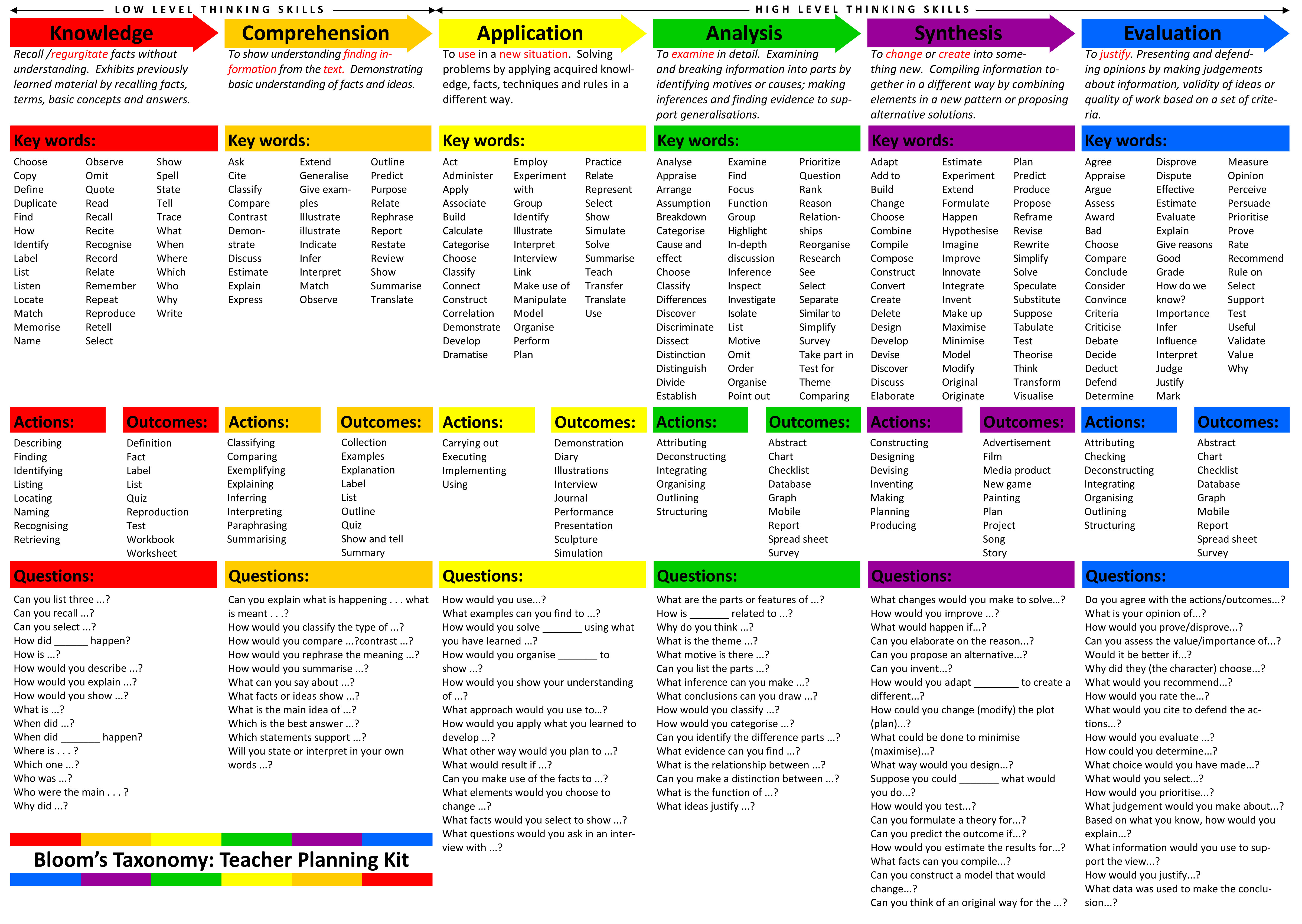
Great resource for teachers -
provides definition, key words, actions, outcomes and questions for the
thinking skill levels in Bloom's Taxonomy.
tags: teaching instruction bloom's taxonomy assessment
tags: teaching instruction bloom's taxonomy assessment

Collection of story starter ideas for writing assignments or digital storytelling activities.
tags: writing prompts storytelling digital storytelling resources
tags: writing prompts storytelling digital storytelling resources
From PBS Learning Media, this 5
minute video relates the history behind single women homesteaders and
the 1862 Homesteading Act. You can opt to stream or download the video.
You can also see the standards tied to this content.
tags: social studies classroom resources pbs videos
tags: social studies classroom resources pbs videos
As you explore the various
demographical information available, the country size will shift to
indicate the data being depicted. This is a great for visual learners!
With one quick glance you can see which country has the highest number
in a specific area. When you hover your mouse over a country, you will
get the country name and actual numbers.
tags: maps demographics geography interactive web2.0 resources technology
tags: maps demographics geography interactive web2.0 resources technology

Monday, March 2, 2015
Getting my art on at TIG

This month at TIG we took a different exploration direction and did something totally non-techie. Well, you could turn it into a techie thing depending on the tool you used, but I'll talk about that more later. A 'new' educational trend is Sketchnoting. To look at a sketchnote, you would say 'Oh, that's just someone doodling while they are taking notes.' True, sketchnoting is a form of doodling, but it is doodling with a purpose. Basically, sketchnoting is a visual method of note taking. It is a combination of writing and drawing to create more visually appealing notes. There are many methods to choose from when sketchnoting. You can use a mind mapping approach, a linear approach or even a boxed approach.
 |
| http://nuggethead.net/2013/09/preparing-sketchnote-format-visual-flow-and-materials/ |
 |
| My first Sketchnote experience |
Now, I am not an artist by any means. My middle school art teacher told me to give up the craft because I was too much of perfectionist. I've never even been much of a doodler even when we use to have the old corded telephones in our homes. It wasn't for lack of trying, but I never could think of anything to doodle. However, after experiencing sketchnoting first hand, I found myself buying some colorful pens and a sketch book. I've started practicing my doodling skills with some assistance from online resources and the Sketchnote Workbook by Mike Rohde.


As I started writing this blog post, I started thinking and looking at how sketchnoting might be used in the classroom. First, I want to say that sketchnoting might not be for all learners, however, it's not a bad thing for all learners to experience new forms of learning. Why? Well, it gives us new perspectives into learning and you never know when a new form of learning might actually work for you. One idea we did talk about in TIG was having students watch a content video created by yourself or someone else and sketchnote the key points. Then put the students into small groups and have them compare their notes and reflect on the experience. What key points stood out to them? Did they miss anything? Do the visuals help you understand the concept? What did you draw and why did you draw it?


As sketchnoting is still fairly new on the education scene, I did some digging to find other ideas for using this form of note taking with students. Check out these examples:
Mindmapping - This activity combined low-tech and high-tech to create a completed product.

Unit Summaries/Reviews - Great way to sum-up the key concepts over specific units
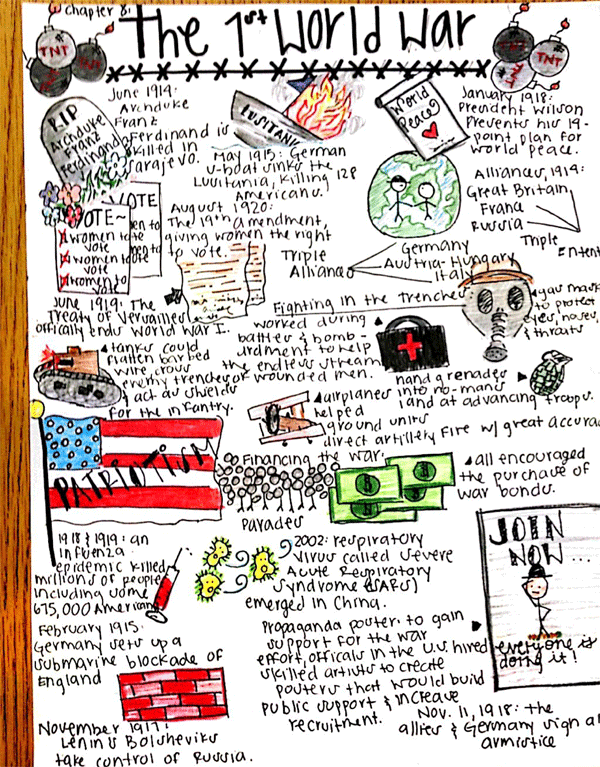
Book Review/Summary - Take the traditional chapter summaries and add a visual flare

More ideas:
Learn more about Sketchnotes:
Sketchnoting - visual note taking tips, pointers and practice
What do think? Are you game to try some sketchnoting personal? Would you be willing to try this with your students? I'd love to hear about your experiences with sketchnoting!
Wednesday, February 18, 2015
Draggo

Draggo is a bookmarking tool for those websites you want to remember or use on a regular basis. You can group your bookmarks with topic specific tabs and then into various categories on each tab. Bookmarks can be moved and edited as needed. A couple years ago I created Draggo accounts for each school building (except Westside - sorry) in our district in an effort to provide links to tools and websites that the students would use regularly - or for a specific teacher - throughout the course of the school year.
In the elementary buildings, teachers have their students set the building Draggo page as their homepage whenever they get on the Internet. This makes it easier and faster for students to access the websites they need during class. Students have no need to log into Draggo. They just choose the tab they need and find the bookmark in the category given to them by their teacher. Here are the links to each building Draggo page:
I have encouraged teachers to take ownership of their building Draggo page by giving them the log in information so they can add and remove links, categories and tabs. I do ask if a specific grade or teacher has a tab that you not edit or remove their tab. We are limited to seven tabs, so if we are running out of tabs, let me know so I can assist in making some modifications. If you never received the log in information for you school's Draggo page, please email me and I will send that out to you.
Draggo is not the only bookmarking tool available, but at the time it was highly recommended. If you are interested in exploring other visual bookmarking tools to use with your students, you might check out:
"How-To" Edit Draggo

Website Wednesday...for February
I just realized today that this month has been so full I haven't had time to post any of the great Website Wednesday resources. So here is the collection for February. I hope you enjoy!

This chart provides examples for shifting your traditional homework assignments to engaging, learning tasks for students.
Although the designated Random Acts of Kindness Week is over, there are some excellent resources and ideas to continue encouraging Random Acts of Kindness in your classroom, school and community.
Great resource for geography!

Get a basic understanding of Augmented Reality (AR) along with some printable interactive resources that you can use right way in your classroom.
Take this Internet Safety test from the Safer Internet Centre. Students are given different scenarios and must determine the best course of action. Good resource for digital citizenship.
Explore and study the Middle East - the past and the present - with these 40 various maps covering political borders, demographics, religion and more.

On historypin, history is recorded with photos from the past and present. As a teacher, you could use this site by having students explore and interact with photos from specific time periods and/or locations. There are photo collections and tours that you could use as a whole class or individually. These are great primary sources for studying history. Check out this video to a short intro to historypin - https://www.historypin.org/about-us/.

Fun Facts for Kids on Animals, Earth, History and more! Please note that this link is beta mode right now, so feel free to give them feedback so they can improve this fun fact resource.

View the Common Core State Standards in one convenient FREE app! A great reference for students, parents, and teachers to easily read and understand the core standards. Quickly find standards by subject, grade, and subject category (domain/cluster). This app includes Math standards K-12 and Language Arts standards K-12. Math standards include both traditional and integrated pathways (as outlined in Appendix A of the common core) and synthesizes Language Arts standards with the Corresponding College and Career Readiness Standards (CCR's).

View the Next Generation Science Standards in one convenient FREE app! A great reference for teachers, parents, and students to easily read and understand the standards. Quickly find standards by various topic arrangements or keyword search.
Subscribe to:
Posts (Atom)