Showing posts with label science. Show all posts

Wednesday, April 8, 2015

Website Wednesday

This blog post focuses on completing Word Work on the iPad with elementary students. Thanks to Kayla Long for sharing this link!

Science Experiments For Kids | The Quirkles
Quirkles is the Science/reading book series that comes with 2 experiments to do at the end. They can be taught in any order so teachers could read the book or books that go along with the letters while they introduce them. Thanks to Renae Hukill for sharing this resource.


This site is loaded with articles, resources and book recommendations geared toward the 4-8 grade educator. Topics are wide and varying.

"Classrooms can Skype with a Yellowstone National Park ranger to learn more about geology (geysers, hot springs, volcanoes), ecology (fire; wildlife--bears, bison, elk, wolves, and more), or cultural history (Native American, world's 1st national park, tourism). Students can interview a park ranger or try to guess which park the ranger works in."

Wednesday, March 11, 2015

Website Wednesday


Speedometry – Learn Math and Science | Hot Wheels
Register for your free Hot Wheels kit and download the lesson plans that address STEM integration.
tags: stem physics math science lessonplans
Free games for helping students learn about place value.
tags: place value math mathgames
Place Value lessons and games by Sheppard Software. Students will identify the digits, compare numbers, learn different ways of showing a number, and more. Geared toward elementary students.
tags: place value math mathgames
"...the following series of fill-in-the-blank prompts can be used by teachers to create lessons, students to create projects–or teachers to collaborate with students to create lessons–or projects. Or, well, you get the idea. I use these sorts of stems to create “learning blends” for students–either with them, or for them. I couple these prompts with other components–technology like apps or social media channels, texts from literary classics to postmodern non-fiction, creativity, or even local matters of citizenship." -from Terry Heick, author of this resource
tags: prompts projects PBL questions collaboration resources
Kid-friendly songs teaching students about similes & metaphors, prepositions, prefix or suffix, perimeter, triangles, and more. Most seem appropriate for upper elementary and middle school students, but the high school students might enjoy similes & metaphors.
tags: videos grammar math resources

Wednesday, March 4, 2015

Website Wednesday


From Free Technology For Teachers - This blog post features a short video created by Minute Physics on how modern light bulbs work and how the design has changed over the last 100+ years. it also provides applications for classroom use.
tags: light bulbs electricity activities teaching videos
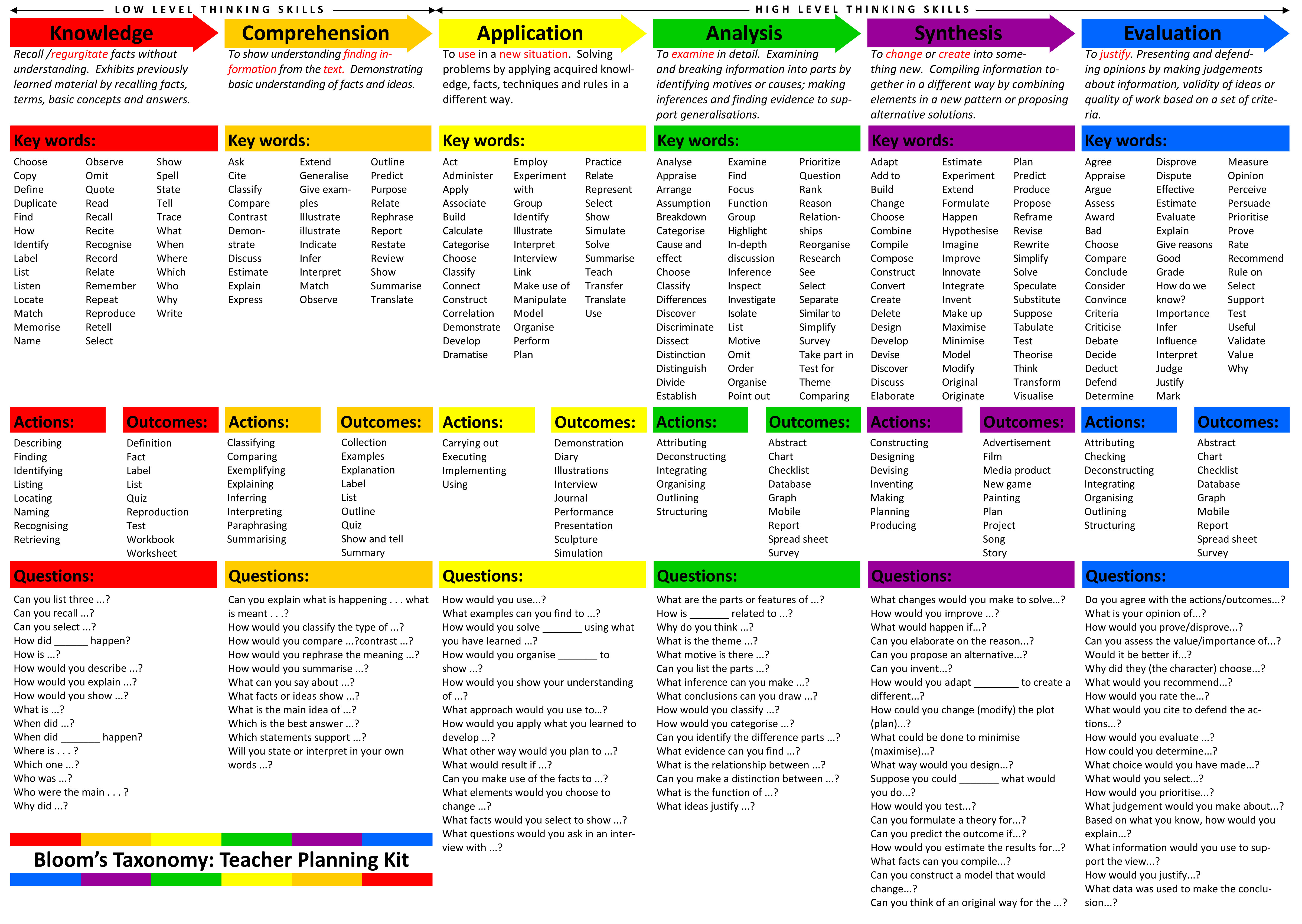
Great resource for teachers - provides definition, key words, actions, outcomes and questions for the thinking skill levels in Bloom's Taxonomy.
tags: teaching instruction bloom's taxonomy assessment
Collection of story starter ideas for writing assignments or digital storytelling activities.
tags: writing prompts storytelling digital storytelling resources
From PBS Learning Media, this 5 minute video relates the history behind single women homesteaders and the 1862 Homesteading Act. You can opt to stream or download the video. You can also see the standards tied to this content.
tags: social studies classroom resources pbs videos
As you explore the various demographical information available, the country size will shift to indicate the data being depicted. This is a great for visual learners! With one quick glance you can see which country has the highest number in a specific area. When you hover your mouse over a country, you will get the country name and actual numbers.
tags: maps demographics geography interactive web2.0 resources technology


Wednesday, January 28, 2015

Website Wednesday

Search apps for the iPhone, iPad and Android using a variety of search methods. Select a specific category from general categories to specific topics. Use the filter to only see apps that are free, have no in-app purchases and are for a specific age grade. Great resource when looking for apps to use at school or home.
The quick and safe way to find and cite images for class! Searches through the Creative Commons photos on Flickr. *Please note that the students will not be able to see the images at school, but they could use this tool at home to find photos for their school projects. They still need to give credit.
Provides math games geared toward specific concepts at each grade level for K-6. You can access four games without registering. Teachers can join for free, which allows teachers and students to access all the games for free while at school. You must pay for students to use these games at home.
Great resource for information on President Lincoln. Provides activities, research topics, critical thinking questions, vocabulary, lesson plans and more.

Help students understand the human body - including the skeletal, muscular, circulatory, respiratory and nervous system - with these 14 StudyJams! activities.

Posted from Diigo. The rest of my favorite links are here.

Wednesday, January 7, 2015

Website Wednesday


Posted from Diigo. The rest of my favorite links are here.

Wednesday, October 29, 2014

Website Wednesday


Posted from Diigo. The rest of my favorite links are here.

Thursday, October 23, 2014

Website Wednesday


  • 60-Second Civics is a daily podcast that provides a quick and convenient way for listeners to
    learn about our nation’s government, the Constitution, and our history. The podcast explores themes related to civics and government, the constitutional issues behind the headlines, and the people and ideas that formed our nation’s history and government.
  • Reading resources from the Buck Institution of Education related to Project Based Learning. Great place to get an understanding of PBL - how it works, how to get started, etc.
    tags: PBL teaching
  • Explore various science and health topics on this interactive site. Students can explore topics
    by watching videos, taking a closer look through images, and interacting with games & activities.

Posted from Diigo. The rest of my favorite links are here.

Wednesday, October 1, 2014

Website Wednesday

Posted from Diigo. The rest of my favorite links are here.

Wednesday, September 24, 2014

Website Wednesday


Posted from Diigo. The rest of my favorite links are here.

Wednesday, April 16, 2014

Website Wednesday


  • NGAkids Art Zone interactives offer an entertaining and informative introduction to art and art history. Featuring a variety of art-making tools that encourage exploration and creativity, these activities are suitable for all ages. Simply select a thumbnail image at the left or click one of the colorful banners above to learn more about each program. Great for elementary students.
Posted from Diigo. The rest of my favorite links are here.

Wednesday, March 12, 2014

Website Wednesday


Posted from Diigo. The rest of my favorite links are here.

Wednesday, February 12, 2014

Website Wednesday


Posted from Diigo. The rest of my favorite links are here.

Thursday, February 6, 2014

Website Wednesday

Posted from Diigo. The rest of my favorite links are here.

Tuesday, December 18, 2012

Creepy!

I was recently reading this post on 5 Educational Trends for 2013 just to see the top 5.  Most of them didn't surprise me except for trend 4 - augmented reality.  The author talked about Project Glass and shared the following video:

Since I'm not real familiar with augmented reality, I decided to Google "What is augmented reality?"  I found the best user-friendly definition on the website Pocket-Lint.  They explain augmented reality is "the art of super-imposing of computer generated content over a live view of the world."

Mashable, an Internet news blog, provided a little more complex definition, but they also had a slew of articles to discover more about augmented reality.  While I was sharing the above video with Yvonne, she started wondering when they would come out with a contact lens version of these Google classes.  Wouldn't you know, The Pentagon is already working on this endeavor.


Image from http://www.tumblr.com/tagged/m.t.-anderson
After viewing and reading this information, my first thoughts went to a young adult scifi book called Feed by M.T. Anderson that came out in 2002.  The people in this society have computer implants in their head that feeds them information about their environment, but also sends out advertisements.  I thought how creepy is that!  With these glasses we aren't that far away from the concept in this scifi book.

It started a discussion in the tech office as to what will happen with technology in the next 10 to 20 years.  Of course ever the jokster, Stan started depicting himself as the crochety grandpa who doesn't like any technology you can't touch.  "Give me a keyboard any day!"  I wondered how wearing a device like this would impact every day tasks like driving.  We have issues already with texting and driving.  What would happen if I were watching Finding Nemo in one eye and watching the road with the other.  How would your brain handle that input of information?  How would this impact our society and everyday living?  What would the have and have not divide look like?  How would this impact education?  One thing I can say is it makes science fiction seem more like science fact.

So, what  do you think?

Wednesday, May 16, 2012

Website Wednesday

  • Article focusing on non-fiction text structures in relation to the Common Core Standards. Provides an understanding of the text structure and resources for teaching text structures to students.
  • Provides an article with several close-up photos and video you could use in the classroom. Also has a coloring pages for students.
  • Create customized one-page maps of the world, continents and countries. Maps can be downloaded, emailed or printed. This beta site was created by National Geographic Education.
  • Students can practice their work on measure and estimate with angles through this sailing gaming. It gives them practice in placing and reading a protractor. Appropriate for elementary students.
  • Create you own Jeopardy game from a template or by creating your own template.
  • Practice your spelling and audio skills with this resource from Oxford English Dictionary. Listen to words and try to spell them from one of 3 difficulty levels. Choose between British and American English. Appropriate for 6-12 grade students.
  • Listen and follow along as author's read their children's poems. Search poems by themes, forms or poets OR checkout the "Ask the Poet" section to learn more about poetry writing.
  • Select your topic and chart name. Then print a poster of that chart to display in the classroom OR save it as a pdf & display the chart via your computer project for a class lesson. You could even link this site to your webpage or wiki as a reference tools for parents and students at home.
    tags: math charts
  • A YouTube channel featuring over 400 science experiments that you can use in class. Instructions are easy to follow.
  • Free sound clips that can be imported into Garageband to ehance your project. When you find the sound you want, click the MP3 file for downloading. You can simply drag and drop the file into Garageband; however, don't through the download away until you have finalized your project and shared it with iTunes.
  • This BBC site offers 200,000 digitized paintings from various artists including Degas, Warhol, Bacon, Picasso and more. When completed, the site will show the enter UK national collection of oil paintings and the stories behind the paintings. If you scroll down on the main page, you will find a section for teachers which offers lesson plans and ideas for utilizing these paintings in art, history and more.
  • Encourage digital storytelling with the Zimmer Twins movie making site for kids (suitable for elementary students). The site is monitored on a daily basis for content appropriateness. Students will need to create a free account if they want to save their movies. (A parent or guardian email is required for creating an account, but students could use their school email address if they have one.)
  • Article listing and describing some tools for helping tech with the Common Core Standards.
  • A collection of over 100 play scripts for elementary children. A great resource for engaging students in reading. The plays are short and may be used and performed, but you may not modify or adapt the plays without written consent.
Posted from Diigo. The rest of my favorite links are here.