Showing posts with label videos. Show all posts

Wednesday, March 25, 2015

Website Wednesday


This blog post by Kasey Bell focuses on using Google Maps, Street View and Google Earth.

http://www.edutopia.org/pdfs/blogs/edutopia-finley-53ways-check-for-understanding.pdf
53 ideas for checking student understanding.

The Key Differences Between Summative And Formative Assessments | Edudemic
This short article from Edudemic provides a simple definition between summative and formative assessments. They have also included a handy infographic for those of us who are visual learners.

10 edu-books to inspire and stimulate
Looking for a book to help you go to the next level as an educator? Matt Miller, author of Ditch the Textbook, offers his top ten list.
    75 Practical Ed Tech Tips Videos
    Educational 'how-to' videos created by Richard Byrne, FreeTech4Teachers, covering a variety of topics such as storyboarding, blogging tools and tips, audio recording tools and more.  (See playlist below)


      Wednesday, March 11, 2015

      Website Wednesday


      Speedometry – Learn Math and Science | Hot Wheels
      Register for your free Hot Wheels kit and download the lesson plans that address STEM integration.
      tags: stem physics math science lessonplans
      Free games for helping students learn about place value.
      tags: place value math mathgames
      Place Value lessons and games by Sheppard Software. Students will identify the digits, compare numbers, learn different ways of showing a number, and more. Geared toward elementary students.
      tags: place value math mathgames
      "...the following series of fill-in-the-blank prompts can be used by teachers to create lessons, students to create projects–or teachers to collaborate with students to create lessons–or projects. Or, well, you get the idea. I use these sorts of stems to create “learning blends” for students–either with them, or for them. I couple these prompts with other components–technology like apps or social media channels, texts from literary classics to postmodern non-fiction, creativity, or even local matters of citizenship." -from Terry Heick, author of this resource
      tags: prompts projects PBL questions collaboration resources
      Kid-friendly songs teaching students about similes & metaphors, prepositions, prefix or suffix, perimeter, triangles, and more. Most seem appropriate for upper elementary and middle school students, but the high school students might enjoy similes & metaphors.
      tags: videos grammar math resources

      Wednesday, December 10, 2014

      Website Wednesday

      • Create the code that will light up the holiday tree outside the White House. Enter your code and state, then receive the date and time your code will display on the White House holiday tree. This is a basic drag and drop process to introduce students to coding.
      Posted from Diigo. The rest of my favorite links are here.

      Wednesday, February 19, 2014

      Website Wednesday

      Posted from Diigo. The rest of my favorite links are here.

      Wednesday, January 15, 2014

      Website Wednesday

      Posted from Diigo. The rest of my favorite links are here.

      Wednesday, October 30, 2013

      Getting YouTube Videos for Student Assignments

      Sometimes you find a great YouTube video to introduce, reinforce or review a concept being taught in the classroom.  As educators in our district, you can access and show those videos through your teacher computer, but what happens if a student is absent.  Sometimes, it is necessary for students to watch video content at different times based on the progress they are making in an individual project or assignment.  Below are in instructions on how to download YouTube videos and share them with your students.


      Need to print this how-to sheet?  Click here - Install YouTube Downloader

      Website Wednesday

      Website Wednesday is back!  For those of you new to our blog, I compile a list of 5-10 websites that can be used by educators for student multimedia projects, lesson plans, professional development and more.  Use what you can and push the rest to the side.  You can always come back later if you feel like you missed something.

      Don't forget, you can access and search all the sites bookmarked for Website Wednesdays at https://www.diigo.com/user/gwenlehman.  Search by Tags, lists, titles or URLs.
      Posted from Diigo. The rest of my favorite links are here.

      Wednesday, November 28, 2012

      Buffering Blues

      Ever been watching a video only to have it stop right in the middle so it can buffer?  Buffering can be a frustrating experience for a classroom teacher.  Not only do you have to wait for that video to buffer, but you have to deal with antsy students who don't do well with dead time.  Here are two options for eliminating those "Buffering Blues."

      Option #1:  WonderShare

      Wondershare is a free YouTube Downloader.  Start by installing the application - http://www.wondershare.com/pro/mac-free-youtube-downloader.html.  (Make sure you select your computer type before downloading.)  During the installation process it will install a downloader on all your browsers , so if you have any of them open they will be closed.  Once installed, you can access Wondershare through your applications folder.

      To Use the Program:
      1. Open Wondershare
      2. Go to YouTube via a web browser
      3. Find a video you want to use in the class
      4. Copy the web link (URL)
      5. In Wondershare, click on Paste URL (left side of the window)
      6. Your video will download
      7. Once downloaded, click on the video image to start playing the video
      Benefit - your videos are all in one location
      Drawback - you can't open it in full screen.

      Option #2:  Easy YouTube Video Downloader
      1. Go to the following website - https://addons.mozilla.org/en-US/firefox/addon/easy-youtube-video-downl-10137/?src=userprofile
      2. Click on Add to Firefox
      3. Restart Firefox
      4. Go to YouTube
      5. Find a video you want to use in class
      6. You should now have a button under the video labeled Download.  Click it.
      7. Choose MP4 format - this will download your video either on the desktop or into your downloads folder.

      Benefit - you can open in full screen
      Drawback - image might be distorted in full screen view & you will want to start a folder for your videos to help keep them organized

      Wednesday, May 16, 2012

      Website Wednesday

      • Article focusing on non-fiction text structures in relation to the Common Core Standards. Provides an understanding of the text structure and resources for teaching text structures to students.
      • Provides an article with several close-up photos and video you could use in the classroom. Also has a coloring pages for students.
      • Create customized one-page maps of the world, continents and countries. Maps can be downloaded, emailed or printed. This beta site was created by National Geographic Education.
      • Students can practice their work on measure and estimate with angles through this sailing gaming. It gives them practice in placing and reading a protractor. Appropriate for elementary students.
      • Create you own Jeopardy game from a template or by creating your own template.
      • Practice your spelling and audio skills with this resource from Oxford English Dictionary. Listen to words and try to spell them from one of 3 difficulty levels. Choose between British and American English. Appropriate for 6-12 grade students.
      • Listen and follow along as author's read their children's poems. Search poems by themes, forms or poets OR checkout the "Ask the Poet" section to learn more about poetry writing.
      • Select your topic and chart name. Then print a poster of that chart to display in the classroom OR save it as a pdf & display the chart via your computer project for a class lesson. You could even link this site to your webpage or wiki as a reference tools for parents and students at home.
        tags: math charts
      • A YouTube channel featuring over 400 science experiments that you can use in class. Instructions are easy to follow.
      • Free sound clips that can be imported into Garageband to ehance your project. When you find the sound you want, click the MP3 file for downloading. You can simply drag and drop the file into Garageband; however, don't through the download away until you have finalized your project and shared it with iTunes.
      • This BBC site offers 200,000 digitized paintings from various artists including Degas, Warhol, Bacon, Picasso and more. When completed, the site will show the enter UK national collection of oil paintings and the stories behind the paintings. If you scroll down on the main page, you will find a section for teachers which offers lesson plans and ideas for utilizing these paintings in art, history and more.
      • Encourage digital storytelling with the Zimmer Twins movie making site for kids (suitable for elementary students). The site is monitored on a daily basis for content appropriateness. Students will need to create a free account if they want to save their movies. (A parent or guardian email is required for creating an account, but students could use their school email address if they have one.)
      • Article listing and describing some tools for helping tech with the Common Core Standards.
      • A collection of over 100 play scripts for elementary children. A great resource for engaging students in reading. The plays are short and may be used and performed, but you may not modify or adapt the plays without written consent.
      Posted from Diigo. The rest of my favorite links are here.

      Wednesday, April 18, 2012

      Website Wednesdays

      Posted from Diigo. The rest of my favorite links are here.

      Wednesday, April 11, 2012

      Website Wednesdays

      • Free online World History Atlas.  It contains maps, timelines and narratives that work together to give students a better understanding of history.
      • Recommended Facebook privacy settings for teens. Contains charts you could share out.
      • This site provides free video resources for class or individual use in math, science, history, government, economics, psychology and religion. Narrow your topic and look at the video, video text, lesson plan and additional links. Great for high school students.
      • Site provides information about teaching reading comprehension to students of all ages. Provides specific reading comprehension lessons for grades K-6. It also includes details on Lexile scores, teaching strategies and more.
      Posted from Diigo. The rest of my favorite links are here.

      Thursday, April 5, 2012

      Website Wednesdays

      Posted from Diigo. The rest of my favorite links are here.

      Thursday, March 29, 2012

      Website Wednesdays

      • Helps students practice and master their grammar and writing. Students can learn on their own or teachers can set-up a class and assign lessons & quizzes. You must create an account, but they are free.
      • Create interactive 3-D pop-up books with sound. It has limited stock photos, but you can upload your own. You can also use a webcam to make your students part of the story.
      • Resources for teaching various biology concepts so they can be understood by a high school Freshman. Includes videos that could be used to enhance your class lessons.
      Posted from Diigo. The rest of my favorite links are here.

      Monday, March 26, 2012

      YouTube Playlists


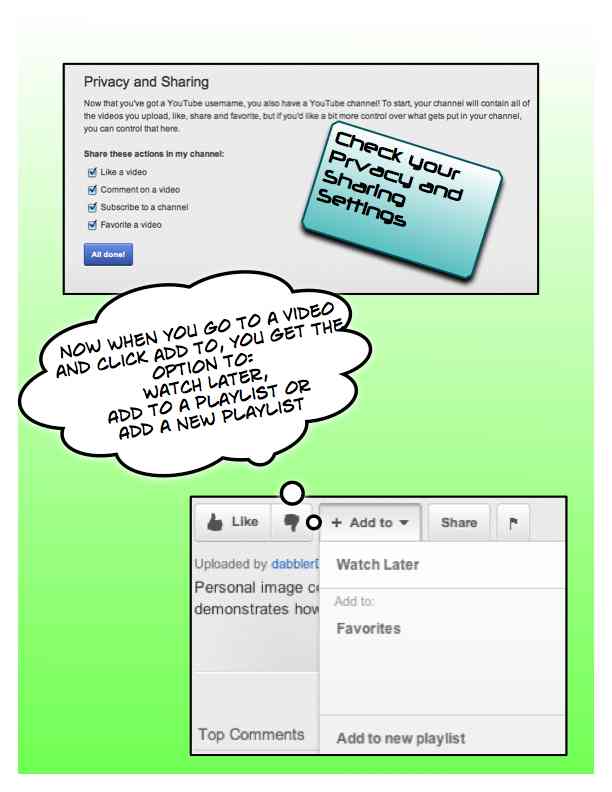
      Do you ever find the perfect video on YouTube to use in your class and then have trouble finding it when you get to school?  Did you know that your school email account is connected to YouTube?  If you go to YouTube and log in with your school email username and password, you can take advantage of creating a Channel and developing playlists for grouping those videos you want to use in the class over and over again.  You can create as many playlists as you like, write notes on the videos when you assign them to a list, and move videos from one playlist to another.


      Once you have created a playlist, you can share it by:

      emailing the URL link - http://www.youtube.com/playlist?list=PLE362C317A3E797BB - OR

      copying & pasting the embed code onto your website, wiki or blog.

      Thursday, March 22, 2012

      Website Wednesdays

      Posted from Diigo. The rest of my favorite links are here.

      Wednesday, March 14, 2012

      Website Wednesdays

      Posted from Diigo. The rest of my favorite links are here.

      Wednesday, March 7, 2012

      Website Wednesdays

      Posted from Diigo. The rest of my favorite links are here.

      Monday, February 27, 2012

      The Fantastic Flying Books of Mr. Morris Lessmore

      The Fantastic Flying Books of Mr. Morris Lessmore just won the Oscar for Best Animated Short Film.  I did a little searching on this film short and happened to find the full film on YouTube.  While I was watching the film, I started reflecting on the storyline and what made this film special enough to win an Oscar.  Then I thought, what a great classroom discussion.  You could use one of the following essential questions:

      Why did this film win an Oscar for Best Animated Short Film?  - I could envision students researching the criteria for an animated short film and how it is evaluated.  They might also research reviews and critiques over the film to help support their response.

      What is the main theme of this film?  Students would need to discuss and evaluate what the story is about and what the main theme should be.  You could turn it into a bit of a debate if you had differing theme ideas.  Students would need to support their argument with examples from the film.

      What specific elements of the film support the following statement, "This story is inspired, in equal measures, by Hurricane Katrina, Buster Keaton, The Wizard of Oz and a lover for books."


      The Fantastic Flying Books of Mr. Morris Lessmore is also available as an interactive eBook app on iTunes created by Moonbot Studios.  Also available from Moonbot Studios is Numberly, a story about the origin of the alphabet.

      Monday, February 20, 2012

      Weekly Websites

      Posted from Diigo. The rest of my favorite links are here.