For all those curiosity questions, Wonderopolis will meet your need. Check out the Wonder of
the Day or explore various wonders from the category listings. Have a specific wonder? Then go to What are You Wondering and type in your question. Great tool for extended learning for learners of all ages!
Have a student interested in creating and recording their own music. Throw them at Soundtrap,
an online music creator. You can connect your own instruments or use the software instruments to create your song recording. Use your computer mic to record your lyrics too. Soundtrap can be used on a variety of devices - Apple, Anrdoid, Linux, Windows and Chromebooks.
This provides a more extensive list of channels for educators and includes categories for the arts, foreign languages, history, and university channels.
This list by EdTechReview is grouped by the following categories: general (more for your own professional learning), physical science, engineering & technolog, and mathematics.
Sometimes you find a great YouTube video to introduce, reinforce or review a concept being taught in the classroom. As educators in our district, you can access and show those videos through your teacher computer, but what happens if a student is absent. Sometimes, it is necessary for students to watch video content at different times based on the progress they are making in an individual project or assignment. Below are in instructions on how to download YouTube videos and share them with your students.
During a break at our Google Drive Tech Training, I shared some of the top 5 Superbowl commercials. Several people asked if I would share out those commercials, so here they are.
#5 Where do babies come from? Got to love The Wheels on the Bus
#4 The Rock runs out of milk
It's The Rock. What else can you say?
#3 Doritos Goat for sale
A screaming goat?!
#2 GoDaddy gross-out
I found this one to be a little gross myself.
#1 Budweiser clydesdales
It's like those Hallmark commercials that make you break out the tissues.
Those may be the top 5 talked about commercials, but having been a librarian I had to laugh at the Oreo "Whisper Fight" commercial. I was never a shushing librarian myself. I was probably the loudest one in the room.
Ever been watching a video only to have it stop right in the middle so it can buffer? Buffering can be a frustrating experience for a classroom teacher. Not only do you have to wait for that video to buffer, but you have to deal with antsy students who don't do well with dead time. Here are two options for eliminating those "Buffering Blues."
Option #1: WonderShare
Wondershare is a free YouTube Downloader. Start by installing the application - http://www.wondershare.com/pro/mac-free-youtube-downloader.html. (Make sure you select your computer type before downloading.) During the installation process it will install a downloader on all your browsers , so if you have any of them open they will be closed. Once installed, you can access Wondershare through your applications folder.
To Use the Program:
Open Wondershare
Go to YouTube via a web browser
Find a video you want to use in the class
Copy the web link (URL)
In Wondershare, click on Paste URL (left side of the window)
Your video will download
Once downloaded, click on the video image to start playing the video
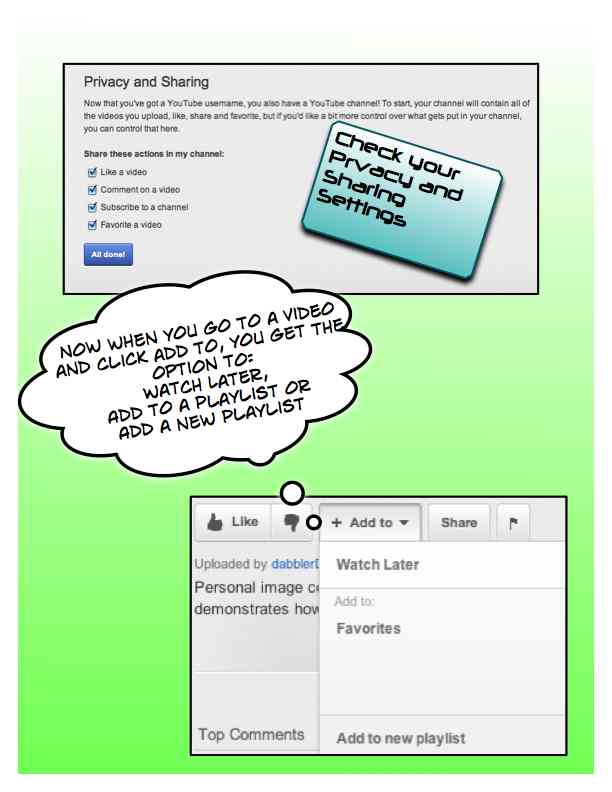
Do you ever find the perfect video on YouTube to use in your class and then have trouble finding it when you get to school? Did you know that your school email account is connected to YouTube? If you go to YouTube and log in with your school email username and password, you can take advantage of creating a Channel and developing playlists for grouping those videos you want to use in the class over and over again. You can create as many playlists as you like, write notes on the videos when you assign them to a list, and move videos from one playlist to another.
Once you have created a playlist, you can share it by:


 This provides a more extensive list of channels for educators and includes categories for the arts, foreign languages, history, and university channels.